

VPN review
VPN.ac review
VPN.ac offers OpenVPN and manually configured WireGuard, compatible router guides and protocol-specific connection limits.
By VPNTrends · Updated 2026-10-21
Our assessment
VPN.ac at a glance
VPN.ac offers OpenVPN and manually configured WireGuard, compatible router guides and protocol-specific connection limits.
Key capabilities
VPN.ac offers OpenVPN and manually configured WireGuard, compatible router guides and protocol-specific connection limits.
Limitations to check
Public USD initial totals: 9 for 1 month, 24 for 3 months, 58 for 12 months, 90 for 24 months. Renewal charges remain unverified.
See platform support ↓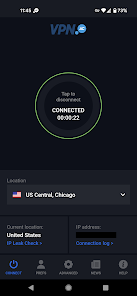
Privacy and connection records
VPN.ac separates browsing activity from connection administration. Its FAQ describes connection information such as the real IP address, session times and transferred traffic while a session is active, with deletion shortly after disconnection. This is a material qualification when evaluating broad no-logs language.
If your decision depends on avoiding connection metadata entirely, consider that distinction before subscribing. A VPN changes the network path and public address seen by websites, but account logins, cookies and device permissions still matter. VPN.ac should be evaluated against your own privacy requirements rather than treated as a guarantee of anonymity.
Native clients and manual protocol setup
VPN.ac provides desktop and mobile software alongside detailed manual configuration guides. Its setup index includes Windows, macOS, Linux, Android and iOS. OpenVPN is a central part of its native desktop workflow, while WireGuard is documented through separate configuration procedures.
That separation matters if you expect to change protocols inside one app. Check the instructions for your operating system before purchasing and allow time for importing settings or using another client. Compatible router guides also provide an alternative for devices without a suitable native app, although firmware and router performance determine what is practical.
Connection limits and desktop safeguards
The account limit is divided by protocol: 6 OpenVPN/IPsec connections and 6 WireGuard connections can be active, giving 12 combined. It is therefore misleading to describe the account as allowing 12 connections with whichever protocol you choose. Our comparison uses the conservative single-protocol figure.
Desktop documentation describes a kill switch on Windows, macOS and Linux. It can continue blocking ordinary connectivity after the VPN disconnects until you disable it. VPN.ac does not offer a dedicated personal IP according to its FAQ, so workflows requiring a stable exclusive address need another solution. Current split tunneling availability remains unverified.
First payment and renewal visibility
The public USD account prices are 9 for a month, 24 for three months, 58 for a year and 90 for two years. Compare those full commitments with the period you actually need. Longer subscriptions reduce the initial monthly equivalent but require a larger payment before you know whether the service fits.
Renewal totals have not been established here. A promotional code appearing in a checkout link does not establish a discount until its final effect is visible, so no extra reduction is assumed. Confirm the amount, tax treatment and recurring terms before paying, especially when comparing a short subscription with a multiyear offer.
Who should consider VPN.ac?
VPN.ac is worth considering if you want documented manual configuration choices, shared addresses and compatible router options. It particularly rewards checking protocol and operating-system instructions rather than choosing only from an advertised device count. Its protocol-specific allowance can suit a mixed OpenVPN and WireGuard household.
It is a less straightforward match if you need an exclusive IP address or require every feature inside one uniform app. Start by listing the platforms and protocols you intend to use together, then compare the relevant limits. This review evaluates documented capabilities and commercial terms; measured speed, leak behaviour and streaming reliability have not been independently tested.
Plans, first payment and renewal
Introductory offers and renewals are different billing periods. Compare the actual charge and included months, not only an advertised monthly equivalent.
| Plan | First payment | Monthly equivalent | Renewal |
|---|---|---|---|
| VPN.ac — monthly | USD 9.00First 1 months | USD 9.00Introductory equivalent | Not verifiedPeriod not verified |
| VPN.ac — quarterly | USD 24.00First 3 months | USD 8.00Introductory equivalent | Not verifiedPeriod not verified |
| VPN.ac — annual | USD 58.00First 12 months | USD 4.83Introductory equivalent | Not verifiedPeriod not verified |
| VPN.ac — 2 years | USD 90.00First 24 months | USD 3.75Introductory equivalent | Not verifiedPeriod not verified |
Public USD initial totals: 9 for 1 month, 24 for 3 months, 58 for 12 months, 90 for 24 months. Renewal charges remain unverified.
Features and platform support
Support can differ between apps and operating systems. Platform coverage and limitations are shown below.
- Windows
Official tutorials provide native software or setup instructions for this platform.
- macOS
Official tutorials provide native software or setup instructions for this platform.
- Linux
Official tutorials provide native software or setup instructions for this platform.
- iOS
Official tutorials provide native software or setup instructions for this platform.
- Android
Official tutorials provide native software or setup instructions for this platform.
- WireGuard / WireGuard-based protocol
WireGuard is available via separate manual setup guides; do not assume integration into the native VPN.ac client.
Verified platforms: Windows, macOS, Linux, Android, iOS.- OpenVPN
Native desktop clients and manual OpenVPN guides cover desktop and mobile platforms.
Verified platforms: Windows, macOS, Linux, Android, iOS.- Kill switch
Desktop client blocks non-VPN connectivity using Windows null routing or macOS/Linux firewall. It may require manually disabling the kill switch after disconnection.
Verified platforms: Windows, macOS, Linux.- Router support
Manual setup guides for compatible DD-WRT, Tomato, AsusWRT/Merlin, pfSense, OpenWRT and other routers; not all consumer routers are compatible.
- Split tunneling
Current official platform-scoped split tunneling support was not established.
Current support not verified.- Dedicated IP available
Official FAQ states that dedicated IPs are not provided; addresses are shared.
Questions about VPN.ac
How many devices can connect simultaneously?
6 OpenVPN/IPsec connections plus 6 WireGuard connections: up to 12 combined, not 12 on either protocol. Catalog uses 6 as the conservative single-protocol limit.
Is the introductory monthly equivalent the renewal price?
No. It divides the exact first payment by its initial service period. Renewal is shown separately with its own charge and period; an unknown renewal is never inferred from the introductory offer.
Does a supported platform include every feature?
No. Protocols, split tunneling and kill switches can have different platform support. Use the feature descriptions above to check the app you intend to use.
How many VPN.ac connections can I use?
6 OpenVPN/IPsec connections plus 6 WireGuard connections can be active simultaneously. The combined total is 12, but either protocol group is limited to 6.
Does VPN.ac offer dedicated IP addresses?
No. Its official FAQ says addresses are shared and dedicated personal IPs are not offered.
Before you choose
Regional offers, taxes and purchase channels can change the amount billed. Paid add-ons are identified separately, and unavailable pricing remains marked as not verified.
We have not conducted hands-on speed, streaming or app tests for this review. No numerical ratings or test badges are assigned.