

VPN review
HideIPVPN review
HideIPVPN combines VPN, Smart DNS and proxy access with 5 simultaneous VPN connections. Native desktop/mobile apps and manual WireGuard/OpenVPN configurations are available.
By VPNTrends · Updated 2026-10-21
Our assessment
HideIPVPN at a glance
HideIPVPN combines VPN, Smart DNS and proxy access with 5 simultaneous VPN connections. Native desktop/mobile apps and manual WireGuard/OpenVPN configurations are available.
Key capabilities
HideIPVPN combines VPN, Smart DNS and proxy access with 5 simultaneous VPN connections. Native desktop/mobile apps and manual WireGuard/OpenVPN configurations are available.
Limitations to check
First month 6.99 USD, then 9.99 USD/month. Annual first charge 59.88 USD, then 69.99 USD/year. The 24-month offer bills 71.76 USD upfront; its renewal amount and period remain unverified. Smart DNS does not provide the same encrypted tunnel as VPN.
See platform support ↓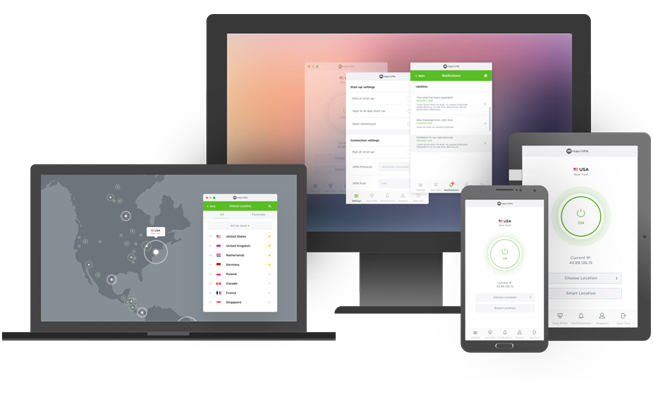
HideIPVPN’s VPN and Smart DNS are different tools
HideIPVPN packages include VPN, Smart DNS and proxy access, but those terms should not be treated as interchangeable protection. The VPN establishes an encrypted connection to a VPN server. Smart DNS changes how supported service requests are resolved; its availability on a device is not evidence that all traffic from that device is encrypted.
The provider describes a no-activity-logs policy. That is useful context for its privacy position, but the service’s marketing language is not a substitute for evaluating your own account, browser and application settings. This review makes no independent audit, anonymity or performance claim based on the presence of those features.
Five VPN connections and several setup routes
The reviewed paid package allows 5 simultaneous VPN connections. That number is separate from the unlimited-device wording used for Smart DNS. A household counting phones, laptops and other always-connected equipment should use the VPN allowance when deciding whether a single subscription is sufficient.
Native software is listed for Windows, macOS, iOS and Android. Linux support comes through manual Ubuntu tutorials, including OpenVPN and WireGuard. Compatible DD-WRT router configuration is also documented. Manual configuration can be useful for devices outside the native app list, but it does not guarantee the same controls, interface or reconnection behaviour as the provider’s desktop software.
WireGuard, OpenVPN and the Application Killer distinction
Official tutorials list WireGuard and OpenVPN for the main desktop and mobile platforms, with manual WireGuard configuration explicitly documented. Confirm whether your intended protocol uses the native application or a separate client. A list of protocols supported by the service does not mean every application exposes every protocol as a built-in option.
The desktop Application Killer closes selected applications when the VPN connection drops and can restart them after reconnection. That differs from a system-wide firewall that blocks all traffic outside a tunnel. A full current kill-switch implementation remains unverified here. Legacy static-routing guides also do not establish modern native split-tunneling controls across all operating systems.
Read introductory charges and renewals separately
The monthly promotion starts with a smaller first payment and then renews at a higher monthly charge. The annual option likewise separates its first-year total from the subsequent yearly amount. The two-year plan provides an exact initial total, but its renewal amount and period are not stated clearly enough to fill in here.
Choosing the longest term therefore means comparing a verified upfront commitment with an unresolved later cost. A low monthly equivalent is not a monthly invoice: the whole longer-term amount is collected for the stated period. Before buying, verify the live order, taxes and renewal conditions, and distinguish the cancellation of the service from any recurring payment arrangement.
Who should consider HideIPVPN?
HideIPVPN can be relevant if you specifically want one subscription containing a VPN plus Smart DNS and proxy tools, and its 5 active VPN connections cover your devices. Its official setup collection gives technically comfortable users options beyond the native software, including Linux and compatible routers.
Look at alternatives if you need a verified system-wide kill switch, a current native split-tunneling interface or an exclusive dedicated-IP product. Those capabilities are left unknown rather than inferred from generic educational articles. The provider’s free trial may help assess basic compatibility, but no trial or paid account was used for this review, and streaming success or measured speeds are not claimed.
Plans, first payment and renewal
Introductory offers and renewals are different billing periods. Compare the actual charge and included months, not only an advertised monthly equivalent.
| Plan | First payment | Monthly equivalent | Renewal |
|---|---|---|---|
| VPN, Smart DNS & Proxy — monthly | USD 6.99First 1 months | USD 6.99Introductory equivalent | USD 9.99Every 1 months |
| VPN, Smart DNS & Proxy — annual | USD 59.88First 12 months | USD 4.99Introductory equivalent | USD 69.99Every 12 months |
| VPN, Smart DNS & Proxy — 24 months | USD 71.76First 24 months | USD 2.99Introductory equivalent | Not verifiedPeriod not verified |
First month 6.99 USD, then 9.99 USD/month. Annual first charge 59.88 USD, then 69.99 USD/year. The 24-month offer bills 71.76 USD upfront; its renewal amount and period remain unverified. Smart DNS does not provide the same encrypted tunnel as VPN.
Features and platform support
Support can differ between apps and operating systems. Platform coverage and limitations are shown below.
- Windows
Native client listed.
- macOS
Native client listed.
- Linux
Manual Ubuntu setup guides; no native Linux app claimed.
- iOS
Native client listed.
- Android
Native client listed.
- WireGuard / WireGuard-based protocol
Manual WireGuard tutorials are listed for all five platforms; do not assume in-app WireGuard.
Verified platforms: Windows, macOS, Linux, iOS, Android.- OpenVPN
Official platform tutorial table lists OpenVPN for all five platforms.
Verified platforms: Windows, macOS, Linux, iOS, Android.- Kill switch
Application Killer closes selected desktop apps after a drop; this is not evidence of a system-wide firewall kill switch. Current full-platform kill-switch behaviour remains unverified.
Current support not verified.- Router support
Manual DD-WRT OpenVPN setup is supplied; compatible router firmware required.
- Split tunneling
Legacy macOS/Windows static-routing tutorials are available, but do not verify current native split-tunneling support.
Current support not verified.- Dedicated IP available
No current purchasable exclusive dedicated-IP product was verified; educational shared/dedicated-IP explanations do not establish availability.
Current support not verified.
Questions about HideIPVPN
How many devices can connect simultaneously?
5 simultaneous VPN connections; Smart DNS device claims are separate.
Is the introductory monthly equivalent the renewal price?
No. It divides the exact first payment by its initial service period. Renewal is shown separately with its own charge and period; an unknown renewal is never inferred from the introductory offer.
Does a supported platform include every feature?
No. Protocols, split tunneling and kill switches can have different platform support. Use the feature descriptions above to check the app you intend to use.
Is HideIPVPN Smart DNS the same as its VPN?
No. Smart DNS does not establish the same encrypted VPN tunnel. Its device allowance should not be substituted for the 5 simultaneous VPN connections.
Is the HideIPVPN two-year renewal verified?
No. The first 24 months cost USD 71.76 in the reviewed offer, but the subsequent renewal amount and period remain unverified.
Before you choose
Regional offers, taxes and purchase channels can change the amount billed. Paid add-ons are identified separately, and unavailable pricing remains marked as not verified.
We have not conducted hands-on speed, streaming or app tests for this review. No numerical ratings or test badges are assigned.